This update makes leave easier to apply and stops leftover credit from going to expired.
1. Multiple half days or hours leaves in one request
- Previously when employee submits for leave applications that has multiple half days, they would need to submit multiple times, for instance:
- 3 half day leaves would result in 3 requests to be approved.
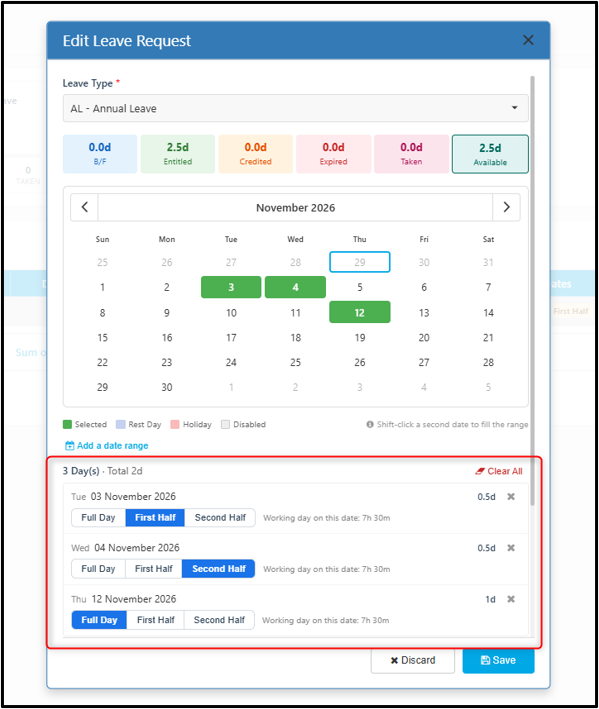
- Now employee can select multiple dates on the calendar and choose whether the leave by Full Day Leave / Half Day Leave (AM / PM) / Hourly Leave Basis.
- Employee can now lump up all half day leave requests and send it to their approver for approval, for instance:
- 2 half day leaves and 1 full day leave would result in 1 request to be approved
How to apply
- Go to Apply Leave and click New Leave Request.
- Pick the leave type.
- In the calendar, click each date you want. Selected dates turn green.
- Each date appears in a list under the calendar. For each date, pick Full Day, First Half or Second Half.
- The working hours for that date are shown beside it.
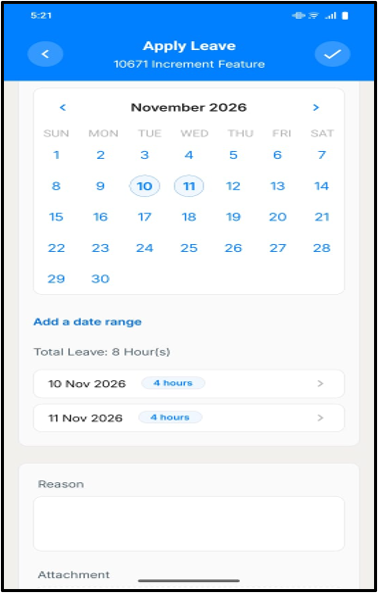
- For an hourly leave type, enter the hours instead.
- Check the total for the number of days of leaves applied, for instance:
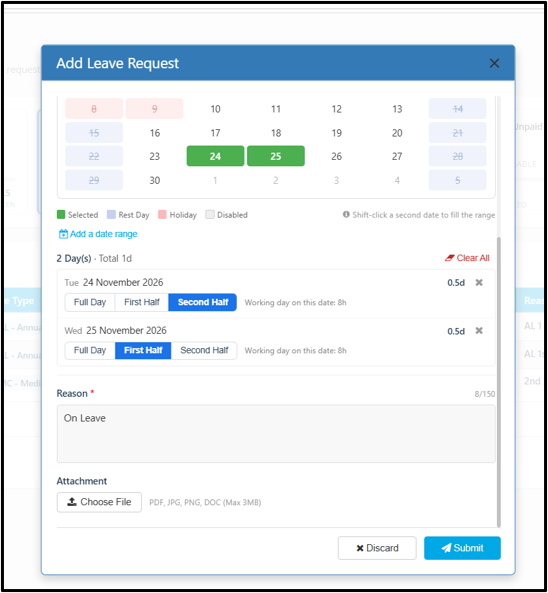
- 25/10/2026 (Half Day AM) & 26/10/2026 (Half Day PM) will show "2 Day(s) · Total 1d". 2 Day(s) is referring to having 2 Days being selected on the calendar and 1d is referring to the total number of days of leaves being applied. - Enter a reason, up to 150 characters.
- Click Submit. All selected dates go to the approver as one request.
Examples
| Employee | Leave Unit | Leave Selection | Number of Request | Total Deducted |
| Ali | Half Day | Mon – Second Half, Tue – First Half | 1 | 1 Day |
| Mei | Hourly | Mon – 4 hours, Thu – 4 hours | 1 | 8 hours |
 |  |
2. Leftover leave credit (e.g. 0.5 day) is used
The system now uses leftover credit first, and Annual Leave (AL) covers the rest. Previously, with 0.5 day of credit left, the employee had to apply for exactly 0.5 day. If they applied for 1 full day, the credit was not used and often expired. Now, when the employee applies for leave, the system automatically deducts from credit first, then from AL.
How it works
- The user applies for leave as normal.
- The system takes from credit first.
- If there are several credits, the one expiring soonest is used first.
- If credit runs out, the rest comes from AL.
- If AL is not enough, the system blocks the request.
Scenarios
Scenario 1: Two credits, full day leave
Ali has two credits of 0.5 day each. One expires on 30 Nov. The other expires on 31 Dec. Ali applies for 1 day. The system uses both credits. It takes the 30 Nov credit first, then the 31 Dec credit.
Scenario 2: Credit is less than the leave
Ali has 0.5 day of credit and 10 days of AL. He applies for 1 day. The system uses 0.5 day of credit first. The other 0.5 day comes from AL. Ali now has 0 credit and 9.5 days of AL.
Scenario 3: Credit is more than the leave
Ali has 1 day of credit. He applies for 0.5 day. The system uses 0.5 day of credit. He still has 0.5 day of credit left.
Scenario 4: Credit is exactly the leave
Ali has 0.5 day of credit. He applies for 0.5 day. The system uses all of it. His credit is now 0.
Scenario 5: Credit covers most of the leave
Ali has 1.5 days of credit and 10 days of AL. He applies for 2 days. The system uses all 1.5 days of credit. The last 0.5 day comes from AL. Ali now has 0 credit and 9.5 days of AL.
Scenario 6: Credit covers only a small part
Ali has 0.5 day of credit and 10 days of AL. He applies for 2 days. The system uses 0.5 day of credit. The other 1.5 days come from AL. Ali now has 0 credit and 8.5 days of AL.
Scenario 7: No AL to cover the rest
Ali has 0.5 day of credit and 0 AL. He applies for 1 day. The credit covers only half. There is no AL for the other half. The system blocks the request.
Scenario 8: Not enough AL to cover the rest
Ali has 0.5 day of credit and 1 day of AL. He applies for 2 days. He has only 1.5 day of leave. The system blocks the request.
Scenario 9: Two credits, small leave
Ali has two credits of 0.5 day each. One expires on 30 Nov. The other expires on 31 Dec. He applies for 0.5 day. The system uses the 30 Nov credit, because it expires first. The 31 Dec credit is still there.
3. Valid from Date
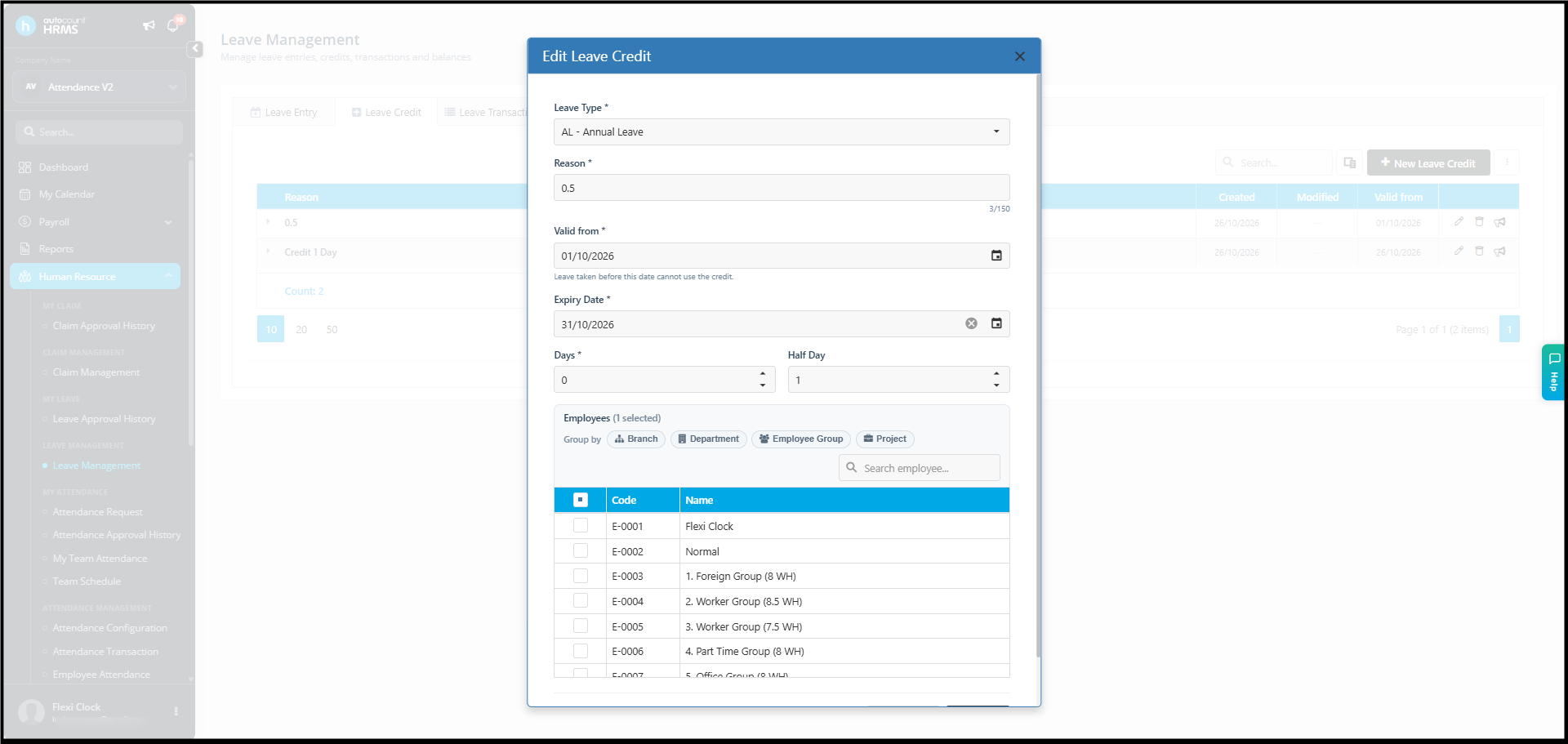
Each leave credit now has a Valid from date. The credit can only be used for leave on or after this date.
- HR sets it in Leave Management > Leave Credit > New Leave Credit, in the Valid from field.
- Leave dates before Valid from cannot use that credit. Those dates are taken from AL instead.
Scenario: Leave starts before the credit is valid
Ali gets 1 day of credit, valid from 26 Nov. He has 10 days of AL. He applies for 25 Nov and 26 Nov in one request. The credit cannot be used on 25 Nov, so that day comes from AL. The credit covers 26 Nov. Ali now has 0 credit and 9 days of AL.